Closure View
The origin of a build output's size, as a Sankey diagram of the closure. Useful for trimming ISOs, netboot images and container layers. View Closure on an entry point's metrics page will open the closure of the newest build.
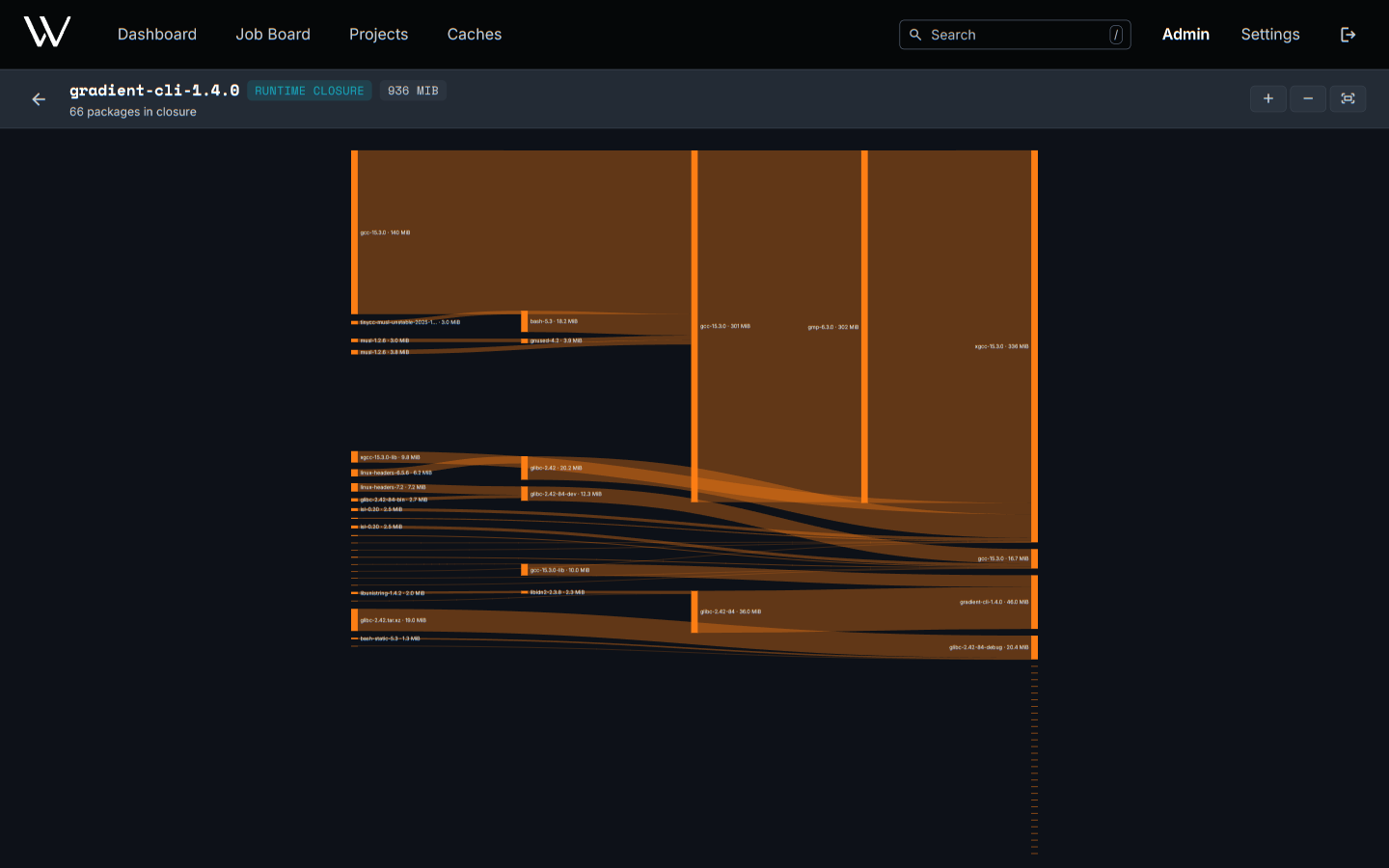
| Area | Content | Actions |
|---|---|---|
| Header | Total closure size, closure type, truncation warning | Zoom in, zoom out, fit to screen |
| Diagram | Packages as bars, flowing from dependencies on the left into the root on the right | Scroll to zoom, drag to pan |
A bar's height is the package's closure size. This size is the package's own NAR plus everything the package pulled in. The tallest bars are the best candidates to remove.
Runtime and Build Closure
| Closure | Contains | Open with |
|---|---|---|
| Runtime | Store paths referenced by the outputs, required at runtime | Default |
| Build | Every derivation needed to build the output | ?type=build in the URL |
The runtime closure can only cover outputs already in the cache.
Large Closures
- The 500 largest packages show one by one. The rest collapse into an others bar under the nearest shown package.
- Packages appear under one parent only. The bars add up to the total.
- The total will stay exact, even with a truncation warning in the header.
Related
- Evaluations and Builds: entry points and the build model
- API: the closure endpoints for scripts