Dashboard
The start page after sign-in, listing every task needing attention across all projects.
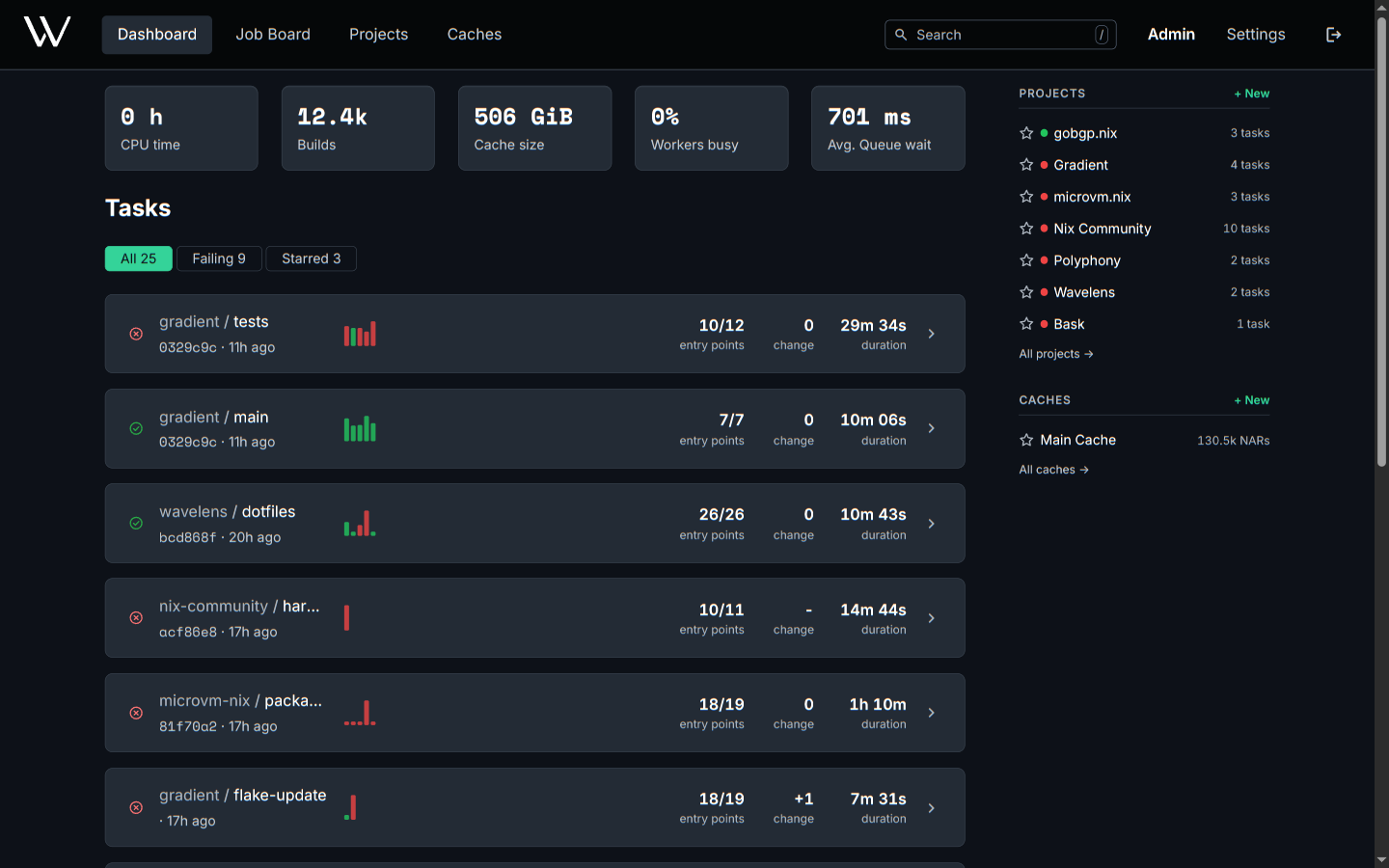
| Area | Content | Actions |
|---|---|---|
| Stats | CPU time, builds, cache size, busy workers and queue wait across the visible projects | |
| Filter | Starred, All and Failing, each with a count. Starred is the default, and hidden while no task is starred | Switch the task list. The choice stays in the URL |
| Task list | The top 10 tasks: latest commit, recent evaluations as bars, entry points ok/total, change in failures, speed | Open a task from the row, an evaluation from a bar. Page through every task with Show all |
| Activity | A calendar of the last year | Switch between evaluations and failures |
| Rail | Projects by rank, caches with starred first | Star a project or cache. Open its tasks |
Bar height in the task list is the duration. Bar color is the status.
New users without projects or caches see the first steps instead. These steps cover creating a project, adding a task, connecting a worker and creating or subscribing to a cache.
Ranking
The task list has the tasks of the user's projects, plus starred tasks of public projects. Four tiers set the order of the list.
- Starred and active
- Active
- Starred
- Member only
A task is active with an evaluation other than a pull request in the last 14 days. The newest evaluation is first within a tier. Pull request evaluations count toward the stats only.
Stars
- Star a project, task or cache from the page header, or a project or cache from the rail.
- Stars are personal. Stars rank and filter only the user's own view.
- Starred items come first in the task list, the rail and the command palette.
Command Palette
/ anywhere outside a text field, or the search field in the header.
| Query | Results |
|---|---|
| A name | Projects, tasks and caches, starred first |
| 7 to 40 hex characters | Commits by hash prefix |
| A store path or NAR hash | NARs in every readable cache |
| Empty | The starred items |
Arrow keys or Ctrl+J / Ctrl+K move the selection. Enter will open the item, and Escape will close the palette.
Related
- Projects and Tasks: the content of the task list
- Evaluations and Builds: the statuses behind the bars